
Introduction
After launching my week of Tiny Experiments, I wanted to dive into the first one that shaped the direction of the whole series. The freedom to pick what app caught my interest — allowing myself to tune into my curiosity and explore with the focus of learning — was refreshing. It felt like there were no limits. This shifted my perspective and allowed me to jump from what at first felt like a consultation into a fun design exercise. I hope to connect with people designing in spaces that catch my attention, to riff off each other and learn together — but most importantly to learn what resonates with me most.
Why Start with Matterport?
Driven by a curiosity about the state of mobile scanning tools — and more specifically how 3D apps perform on mobile — I explored Matterport’s Mobile app, focusing on their onboarding. I wanted to teach myself more about digital twin creation and how well the mobile app stacks up against their professional-grade tools. Could it be enough to share a scan of my office with an architect or interior designer?
Matterport’s app lets users scan real-world spaces and create digital twins — interactive 3D models you can view, edit, or share. It’s a fascinating blend of AR, mobile UX, and professional tooling for industries like real estate, architecture, and construction.
What I Noticed
While exploring Matterport’s onboarding flow, I observed that the process could benefit from streamlining to enhance user engagement. The current sequence felt prolonged, potentially hindering users from quickly achieving their primary goal: capturing their first digital twin.
Drawing from my experience, effective onboarding should minimize friction and guide users seamlessly toward their objectives. For instance, Halide, a professional iOS camera app I downloaded over my holiday break, exemplifies this approach. Its email-based tutorial focused on one thing to try and learn at a time.
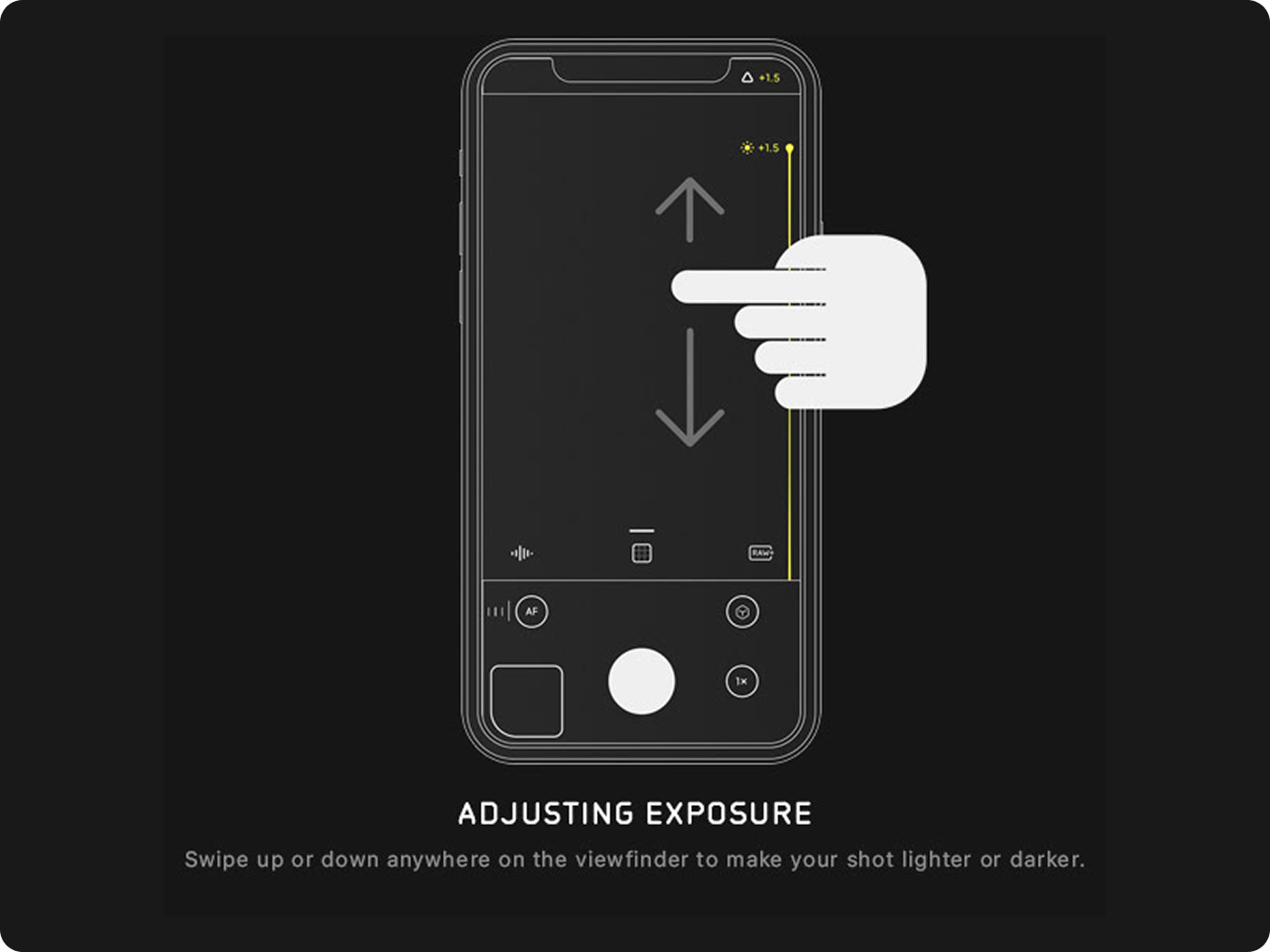 Halide’s onboarding: teaching one interaction at a time, like adjusting exposure with a simple swipe gesture.
The clarity and focus of this single-step tutorial inspired me to rethink Matterport’s first-run experience with a similar “just try it” approach. I contemplated:
What if Matterport’s onboarding allowed users to initiate a scan immediately, even during their first interaction?
By enabling early action, users could experience immediate progress, fostering a sense of accomplishment and encouraging continued engagement.
Moreover, integrating contextual tutorials could reduce cognitive load. This approach respects the user’s time and aligns with their workflow, enhancing the overall user experience.
What I Did
To accelerate user onboarding, I redesigned the Matterport Mobile home screen to prioritize the initial digital twin capture. The revised empty state serves as an intuitive starting point, encouraging immediate action and demonstrating key features prior to the first scan.
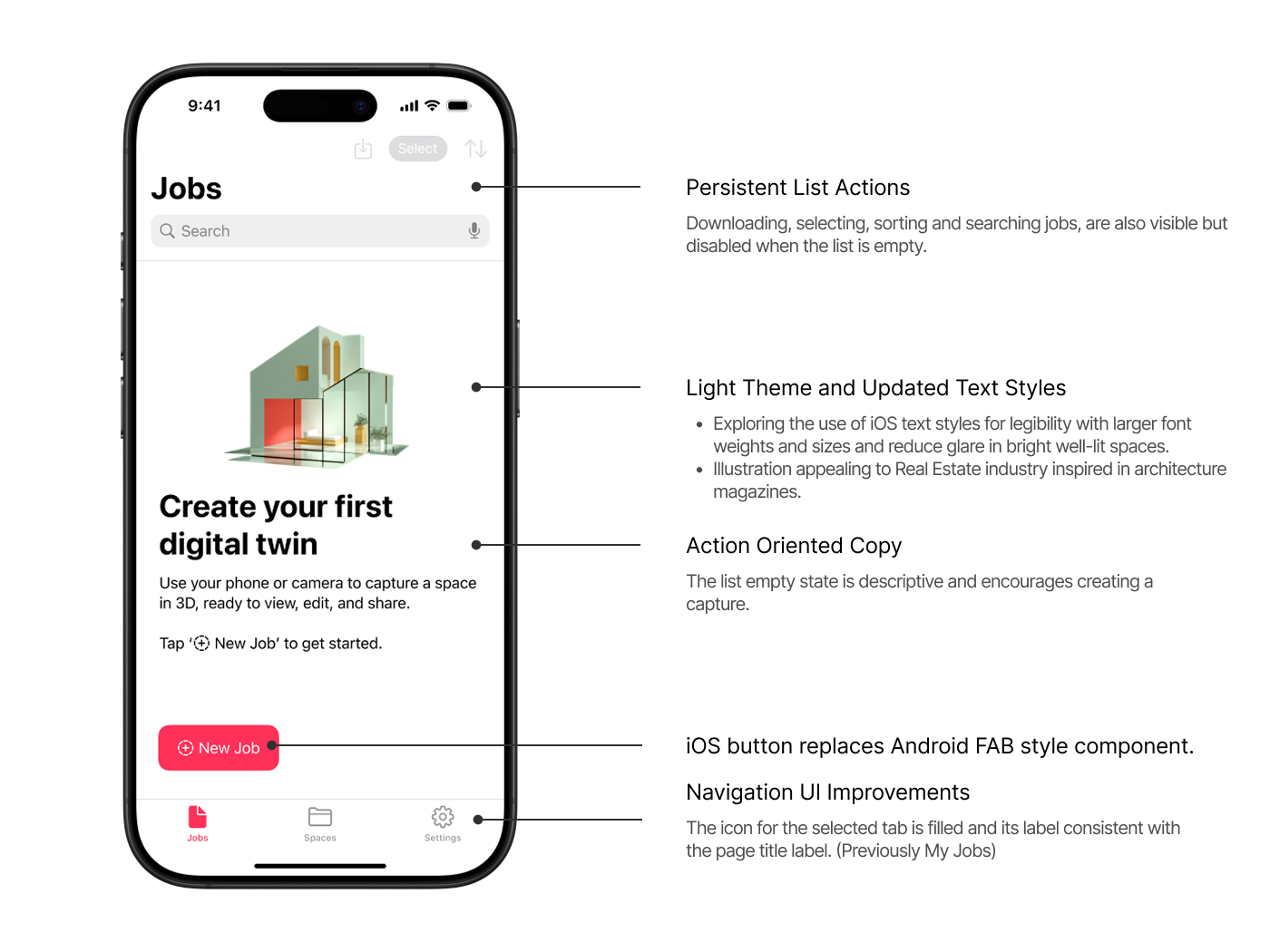 Final redesigned home screen in light mode — updated illustration guides users to begin scanning immediately, with updated text, layout, and interaction patterns.
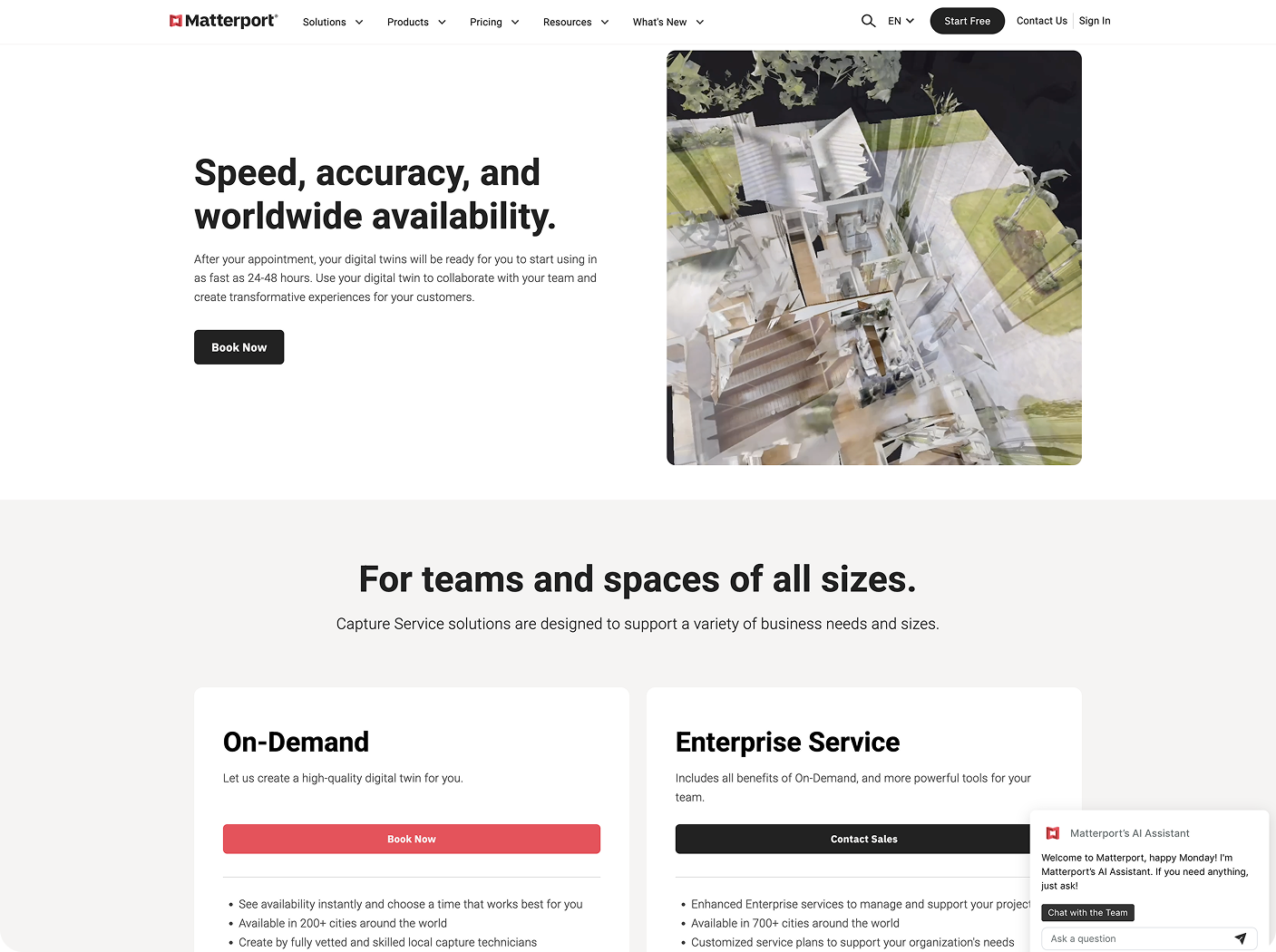 Matterport’s marketing site uses a bright, minimal visual style, white backgrounds, bold black text, and red CTAs. This light theme informed my UI direction for the redesigned app, aligning it more closely with the brand’s tone appealing to the real estate industry.
Key improvements:
Persistent List Actions
Even before any jobs exist, users see disabled but visible options like “Download,” “Select,” “Sort,” and “Search” — providing a preview of capabilities and reinforcing affordances.
Light Theme and Updated Text Styles
Using iOS system text styles improved legibility, especially in bright spaces prone to screen glare. Typography choices follow best practices for accessibility and visual hierarchy.
Action-Oriented Copy
Replaced passive descriptions with direct, encouraging copy — “Create your first digital twin” — to motivate users to start scanning immediately.
Branded UI + Icon Improvements
I swapped Android-style FAB buttons for iOS-native button styles, matched system icons with Matterport’s branding, and used filled tab icons to improve clarity around navigation state.
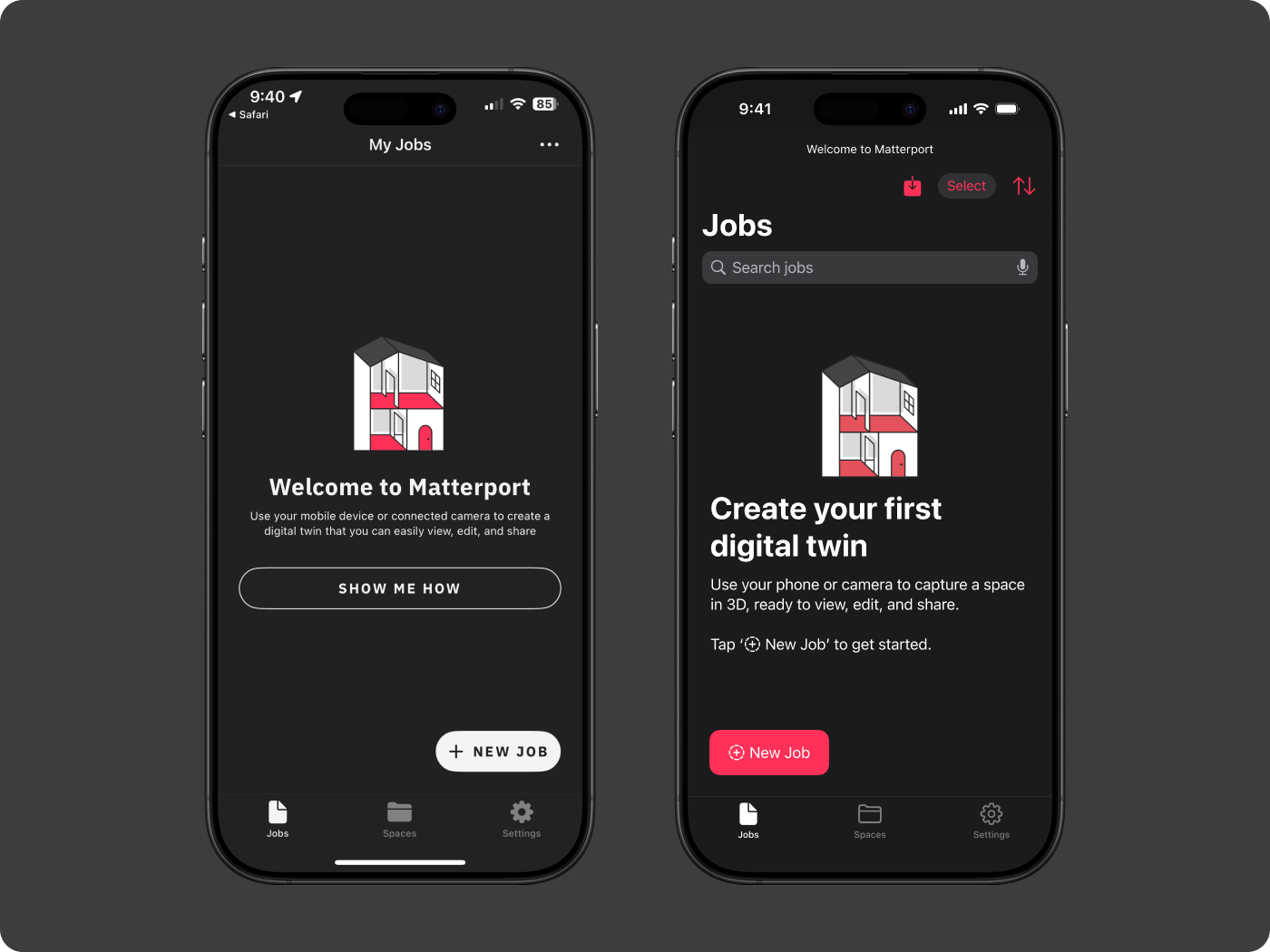 Before (left) and after (right): The main heading guides users to focus on trying a capture first, emphasizing the action button and clarifying that a new job is the starting point for capturing a space.
Onboarding Flow Prototype
Problem: Creating an initial digital twin is currently too time-consuming due to inconsistent tutorial design. I identified at least three different layouts, which hinders the introduction and retention of necessary steps.
Solution: I streamlined the process of initiating a room scan, aiming for a faster and more unified learning experience. The “New job” workflow for digital twin creation is designed to be quick, guided, and rewarding.
Key Design Goals:
- Minimize initial friction by shortening the onboarding to 3 essential steps
- Use contextual guidance to reduce memory load
- Make the tutorial feel like progress, not a delay
- Leverage native iOS patterns for clarity and consistency
- Remove unnecessary or redundant content
Consolidating Tutorial Styles
These are the screenshots of the three different UI patterns I encountered: a checklist, modal cards, and a full-page walkthrough.
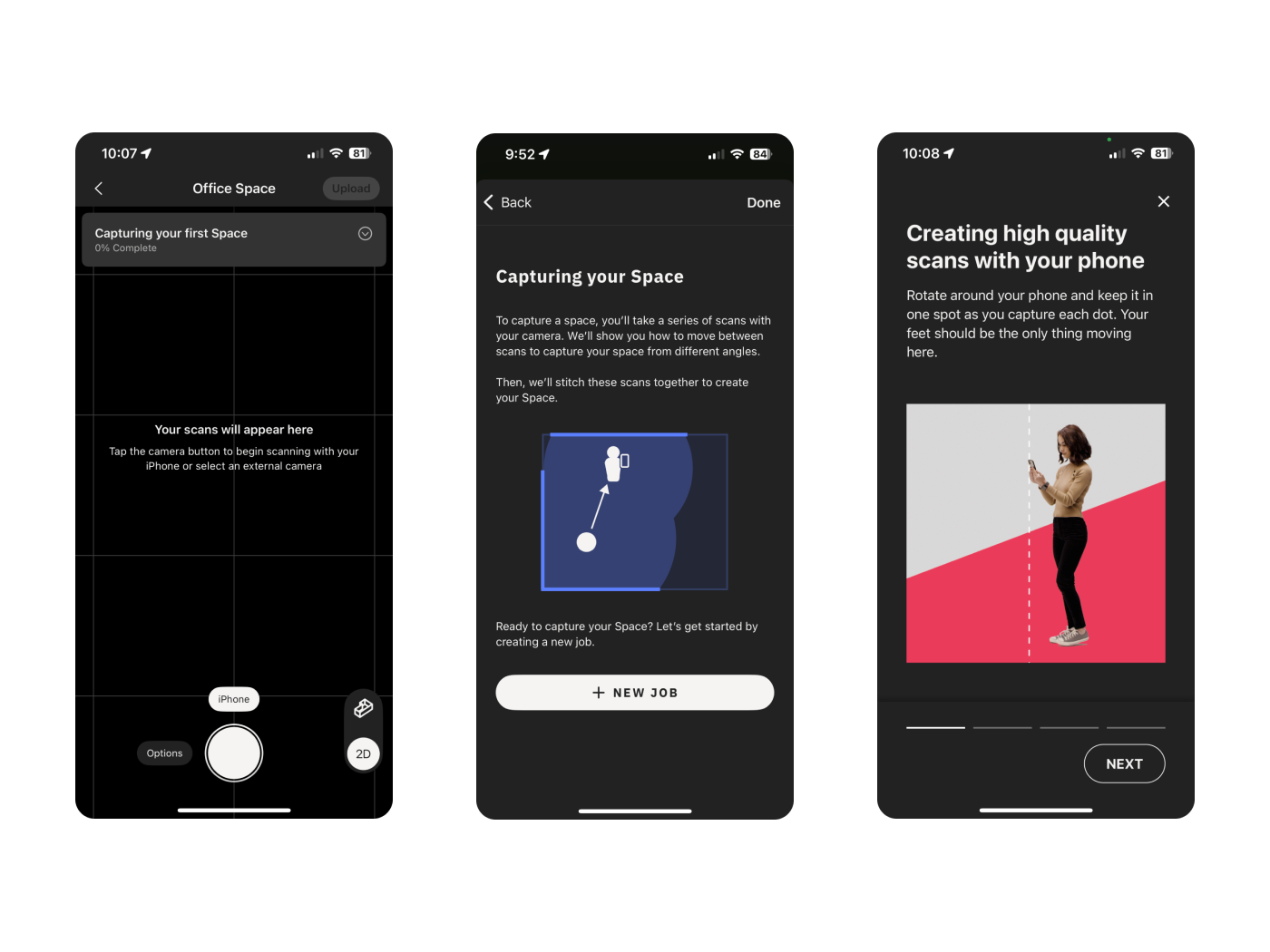 Before: The app used three separate UI patterns for tutorials — checklists, modals, and full-screen pages — each with different navigation behaviors and visual styles. This inconsistency added friction and required users to recall information across steps.
I designed one layout using iOS-native navigation buttons, a title, and a progress indicator. I removed content better suited to be shown in context, reducing reliance on memory recall.
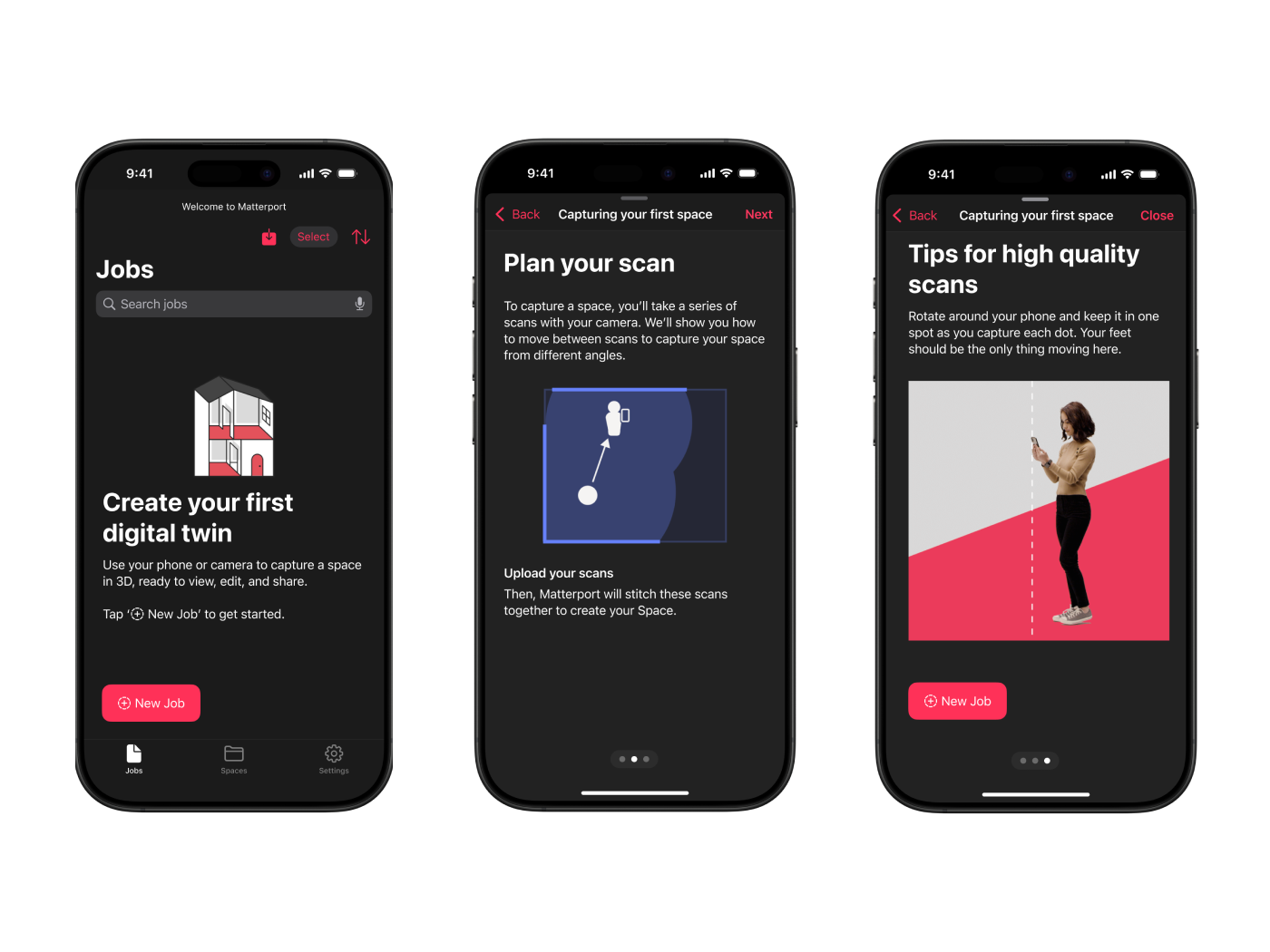 After: A unified tutorial layout using consistent iOS-native navigation, progress indicators, and in-context guidance — streamlined to surface instructions only when needed.
The initial capture flow was weighed down by an easily missed checklist that relied on strikethrough text to show task completion. It wasn’t interactive, and it required users to shift focus mid-scan to interpret progress. From a design standpoint, it broke with principles of progressive disclosure and accessibility. I removed it in favor of surfacing guidance contextually — delivering the right prompt at the right moment, without adding cognitive overhead.
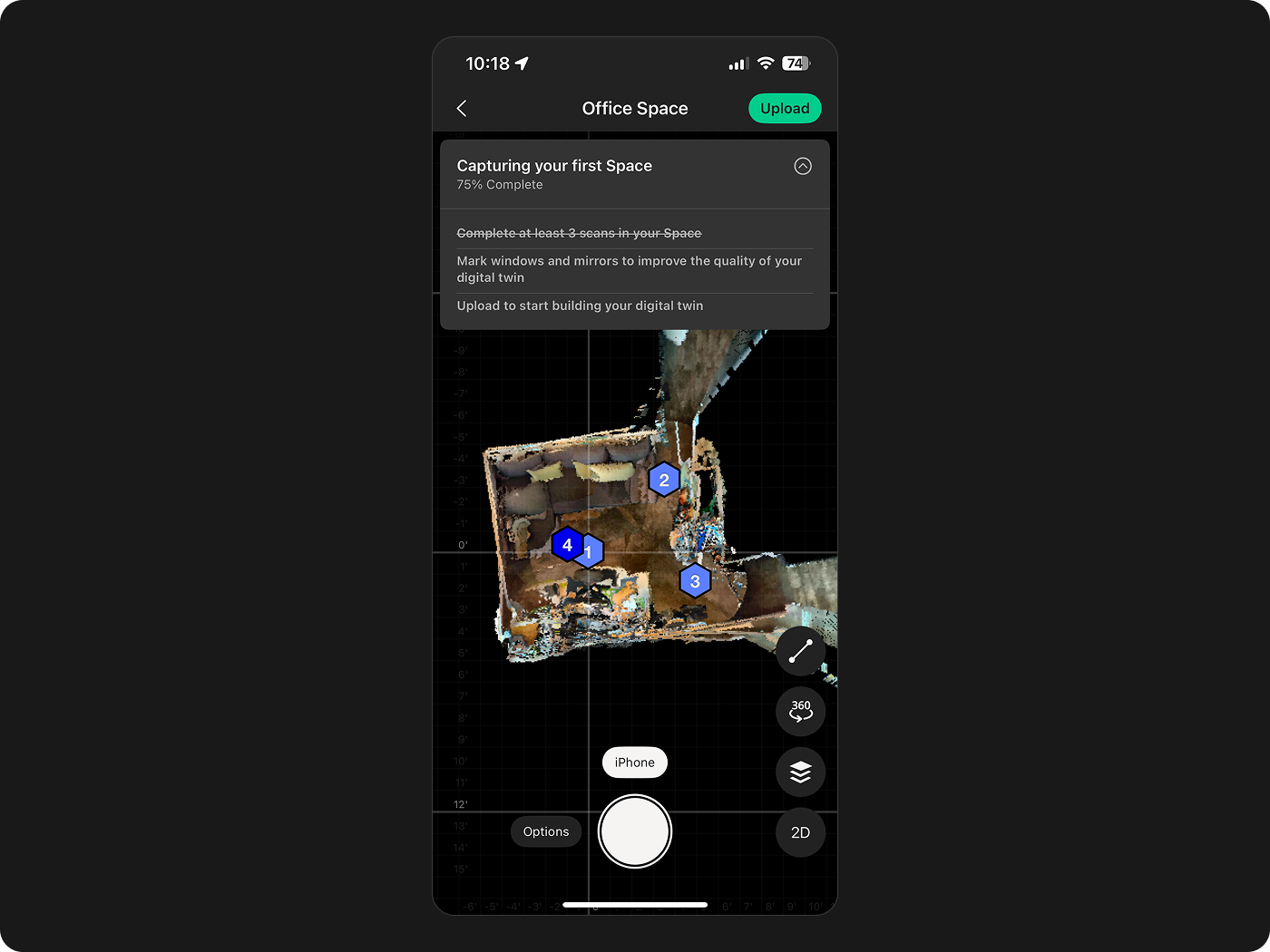 The original capture checklist — tasks like capturing your first space were marked complete with strikethrough text, an easy-to-miss pattern that required users to shift focus mid-scan to track their progress.
Interactive Walkthrough
To bring it all together, I created a clickable prototype showing the redesigned onboarding in action. It walks users through the three essential steps to begin scanning — with no distractions. The goal was to let users experience progress immediately and intuitively.
This animated walkthrough demonstrates the redesigned onboarding flow — from tapping “New Job” to capturing the first scan, with minimal steps and in-context guidance throughout.
Learning by Doing
One of my first college courses was called Pensando con arquitectura — “Thinking with Architecture.” We’d gather to study famous architects by dissecting their work through sketching. Drawing details helped us understand their craft, their decisions. Each team would present a building, then build a scale model to bring it to life. That class taught me to think through making.
I approached this onboarding exercise in the same spirit.
I set up my iOS tools to reconstruct the flow from scratch, swapping in different components, reinterpreting the experience through Apple’s design language. It helped me distill the workflow down to its essence, as if I were guiding someone else through it step-by-step.
This experiment deepened my interest in designing tools that bridge the physical and digital — tools that help people scan, manipulate, and interact with 3D spaces and Digital Twins.
Have you worked on anything like this? I’d love to swap notes, jam on ideas, and find more examples.
More soon from my side — always open to jam.