
The pharmacist says “last name?” and you feel the person behind you lean in. Not deliberately. They’re just close. The counter is narrow. You say your name. Then your date of birth. Then you spell your insurance ID, letter by letter, loud enough for the pharmacist, loud enough for everyone.
Then they hand you a medication you’d rather not name out loud.
I built a prototype to explore what happens when your phone becomes the private channel: the screen carries the specifics and your voice stays social. I built it in Voiceflow, a platform I’d never used before, and I want to share what I designed and what I learned.
The scenario
You arrive at the pharmacy pickup counter. You scan a QR code at the kiosk instead of saying your name. Your phone opens a chat. The system already has your information from the scan: name, insurance, prescription. It confirms one thing immediately: your details will show on screen only.
That’s it. Privacy is on. You didn’t toggle anything.
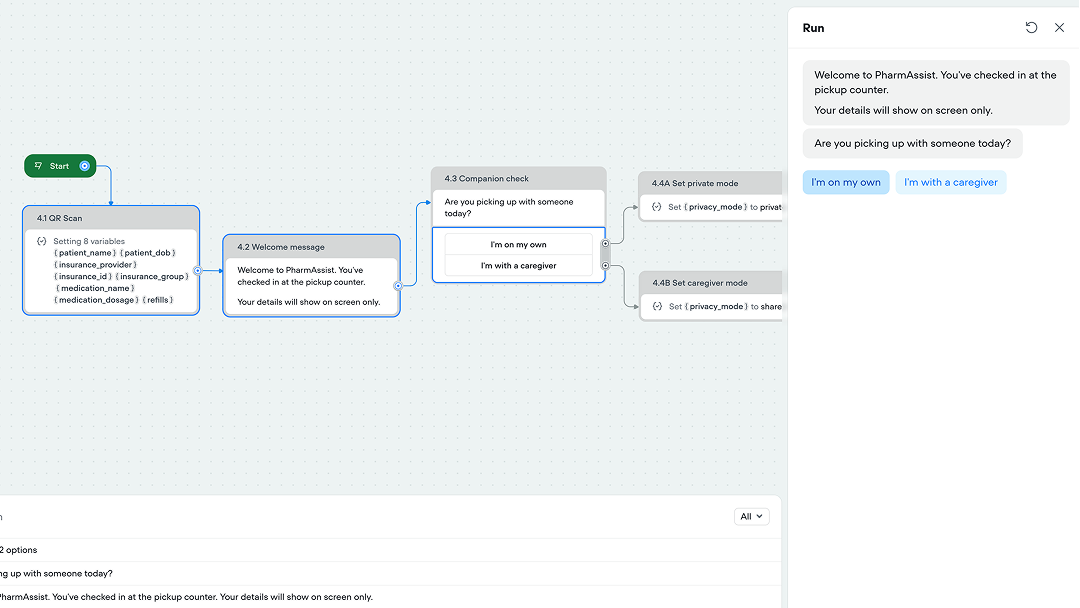 Privacy is on before you say a word. The only question: “Are you picking up with someone today?”
The only question the system asks is whether you’re with someone. Not turning on a “privacy mode”. Instead the kiosk prompts : “Are you picking up with someone today?” If you’re with a caregiver who needs to follow along, you say so. If you’re with a friend who gave you a ride, you don’t. The system protects your information from them too.
Three channels, one interaction
Building this forced me to think about what each communication channel is actually good for when other people can hear you.
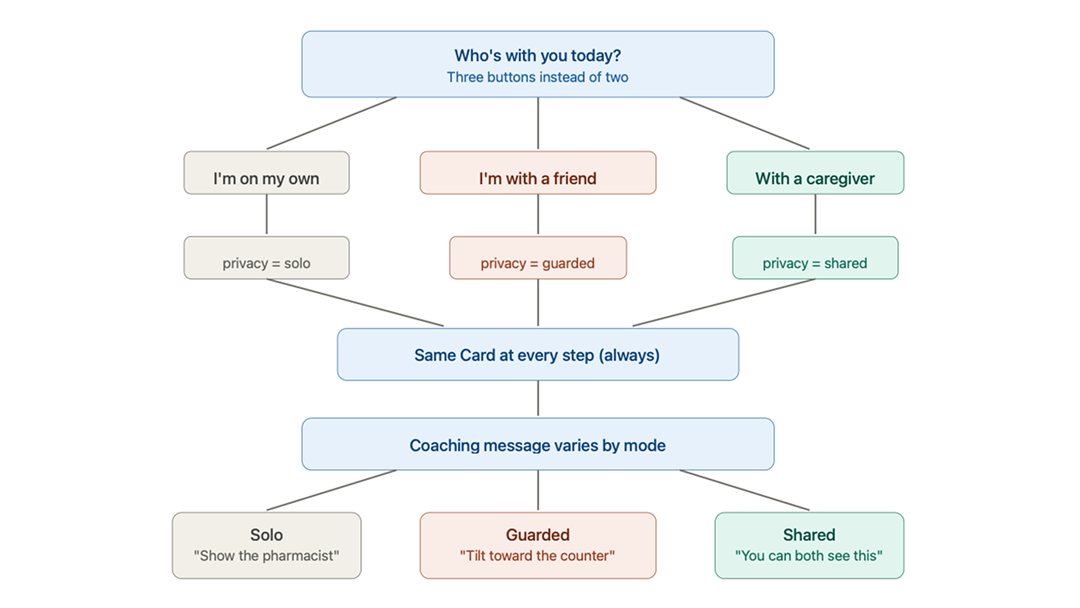 Visualized using Claude’s diagram feature. Four phases, two channels: screen for specifics, voice for social.
The screen carries specifics. Your name, your insurance ID, your medication and dosage: everything private goes to a card on your phone. When the pharmacist asks for information, you show them the phone. The gesture is familiar. It’s how people already hand over insurance cards. This prototype digitizes that gesture.
Your voice stays vague. Instead of saying “Maria Lopez,” you say “it’s right here.” Instead of reading your insurance ID, you say “here’s my info.” Instead of confirming “I’ll take the Sertraline with food in the morning,” you say “got it, I’ll follow those instructions.” The person behind you in line hears nothing.
A text message arrives later. Two hours after you leave, everything the system held back in person arrives privately on your phone: medication name, dosage, your questions and answers from the counter. The first moment the system can be fully specific, because the channel is fully private.
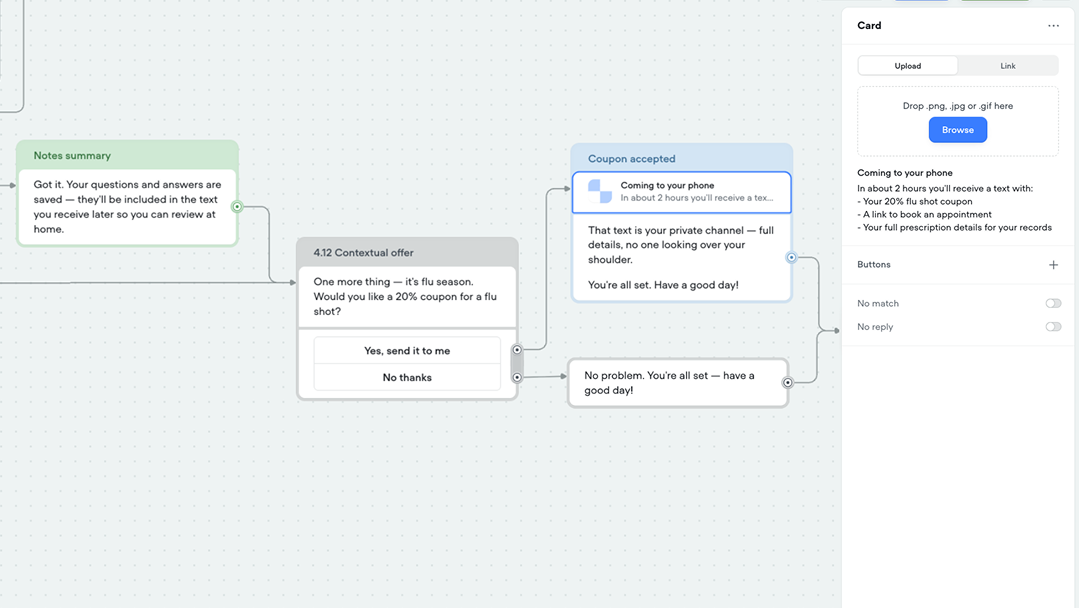 The Card shows private details on your phone. The message below coaches what to say out loud.
What I call the coached phrases
When you’re on a phone call in public and you say “I’ll be there then,” you’re not being vague because you forgot the address. You’re being vague because someone is listening. You use words like “that,” “there,” “those”: words that only make sense if you share context with the person you’re talking to.
In linguistics, these are called deictic expressions. They point to something: a person, a place, a time. They only resolve if you know the context. The pharmacist knows what “that” means because they’re holding the prescription. The person behind you doesn’t.
I started calling this pattern deictic privacy: coaching people to speak in words that communicate with the pharmacist while meaning nothing to bystanders. The system doesn’t silence you. It gives you a social script: “it’s right here,” “here’s my info,” “those instructions.” Words that protect your information through the natural ambiguity of language.
This isn’t a new linguistic concept. Deixis has been studied since the ancient Greeks. But applying it deliberately as a privacy pattern for AI assistants, coaching the system and the person to use deictic speech in public contexts: that’s a design move I haven’t seen in the VUI literature from people I admire, like James Giangola’s conversation design work at Google, Cathy Pearl’s voice interface principles, or Michael Cohen’s foundational VUI methodology.
The pharmacist is still the expert
The part that surprised me most while building was the Q&A loop.
After the pharmacist hands you the medication and explains the dosage, the system asks: “Any quick questions while the pharmacist is right here?”
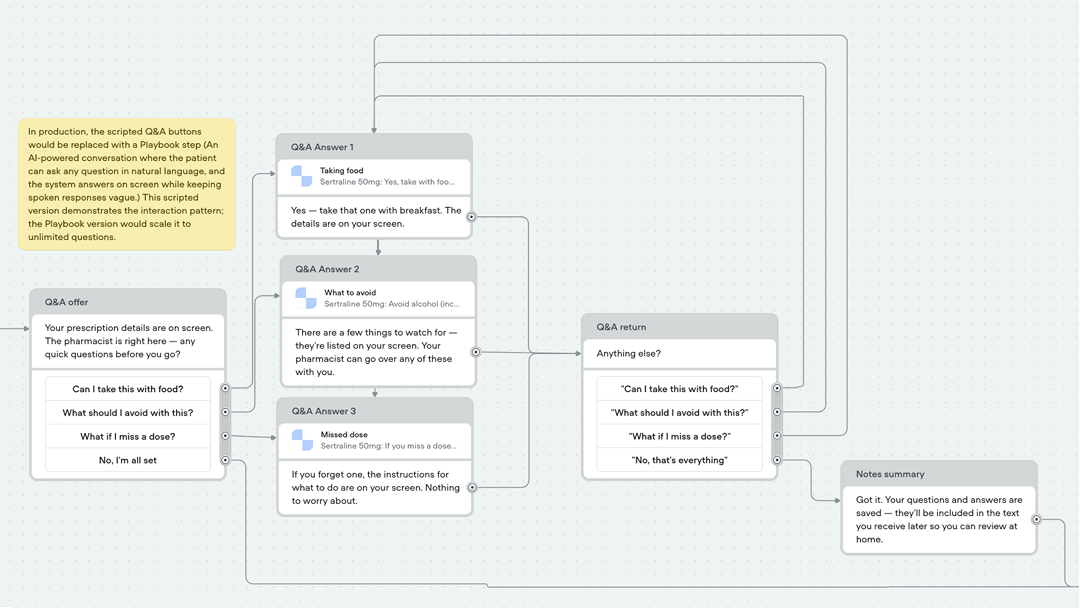 This prototype uses a scripted Q&A loop rather than Voiceflow’s Playbook feature.
This matters because people leave pharmacies without asking the questions they needed to ask. They’re uncomfortable. There are people waiting. They don’t want to say the medication name. They don’t want to seem like they don’t understand the instructions.
The system gives them a way in. Tap a question on screen. Get the detailed answer on screen: drug interactions, missed dose instructions, food requirements. Confirm with the pharmacist out loud using the same deictic language: “so that one with breakfast, right?”
The system captures every question and answer as notes. Those notes arrive in the follow-up text. So what you have is three participants cooperating: the patient asks, the pharmacist answers, and the system records, all while keeping the conversation private from everyone else in the room.
The system doesn’t replace the pharmacist. It makes the human conversation more useful by giving the patient permission to ask and keeping a record of what was said.
What I learned building this in Voiceflow
This was my first time using Voiceflow. I built alongside Gemini, which could see my screen and point me to functions while I was learning the interface. Here’s what I found and the design decisions I made along the way.
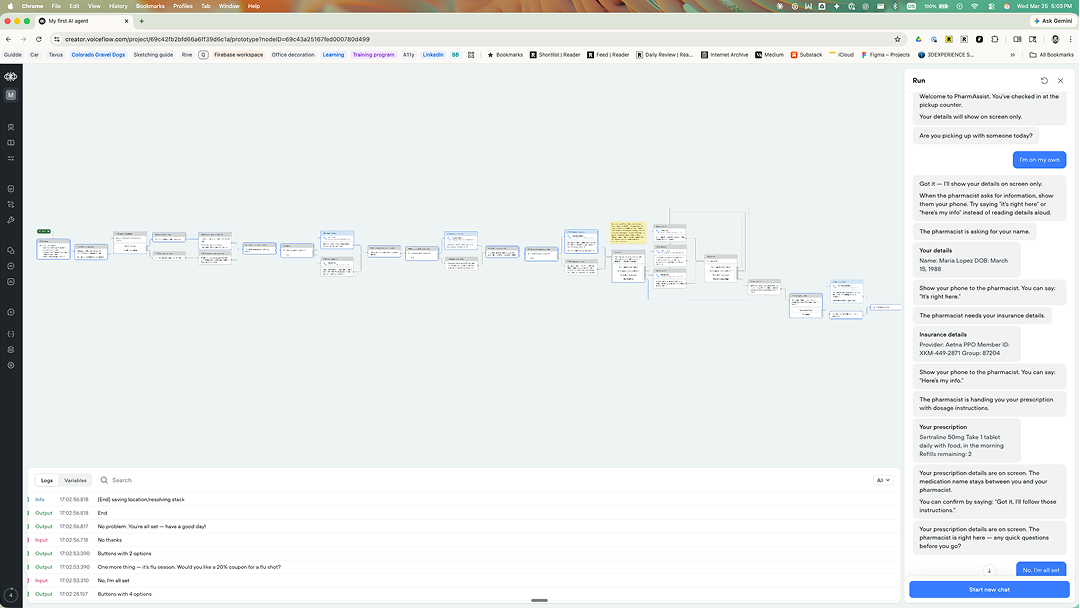 The complete PharmAssist flow in Voiceflow, with the test chat running alongside.
Workflows, not Playbooks
Voiceflow offers two types of skills: Workflows (deterministic, step-by-step) and Playbooks (AI reasons freely). I chose a Workflow because prescription pickup is a regulated process: you verify identity before dispensing medication. The order matters. The steps don’t change.
The Q&A section at the end is where a Playbook would live in production: open-ended questions the patient might ask, answered by AI in deictic language. For the prototype, I used scripted Buttons with pre-written questions. Zero credits consumed. The design argument comes through regardless.
Cards as the phone screen
This was the breakthrough for me. Voiceflow’s Card component displays a visual element, a title and description, in the chat. I used Cards to simulate the phone screen: the private channel that only the patient and pharmacist can see. Messages handle the spoken coaching.
So at every step, the pattern is the same: Card = what appears on your phone screen (the specific, private data). Message = what you’d say out loud (the vague, deictic language).
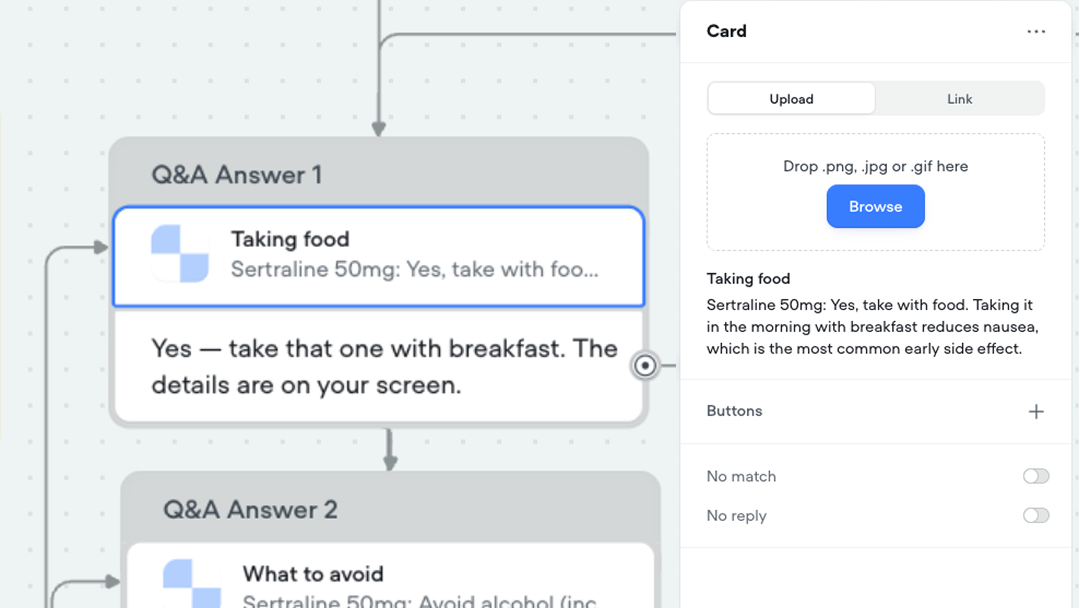 The screen shows the medication name. Your voice says “I’ll take that.” Same moment, two channels.
The privacy branch
One variable, privacy_mode, controls the entire flow. Set to “private” after the companion check, it routes every subsequent step through the Card + coached Message path. Set to “shared,” it routes through Messages that speak details aloud for a caregiver.
The same data flows through both paths. What changes is which channel delivers it. That’s the design decision.
Default-private as “broken-in”
I keep coming back to the metaphor from my earlier essay about multimodal AI fitting like broken-in denim. The system doesn’t ask you to configure privacy. It arrives already shaped to the context: a pharmacy counter where people are nearby. You don’t earn the privacy. It’s the shape the system comes in.
This is the opposite of how most technology works. Usually you adapt to the system before it adapts to you. PharmAssist tries the reverse: already fitted, gets easier with use, never demands your attention to configure it.
What the production version would add
I built this prototype with scripted steps, pre-filled variables, and zero AI credits. A real implementation would add layers, and each one connects to Voiceflow’s architecture:
QR code scan → Web Chat handoff. The kiosk displays a QR code. Scanning it opens the Voiceflow Web Chat on the patient’s phone, passing a patient ID. An initialization Workflow calls the pharmacy API and populates the variables. The patient never speaks their name to check in.
Playbook-powered Q&A. The scripted question buttons become an AI conversation where the patient asks anything in natural language. The Playbook inherits the Global Prompt guardrails, “never speak a medication name,” so even AI-generated answers use deictic language.
Twilio follow-up text. An API Tool triggers an outbound SMS two hours after pickup. The text includes the full prescription details, the Q&A notes, and the flu shot coupon. The first fully specific channel.
Samsung Privacy Display integration. For the phone screen itself: restricting what side angles can see, automatically activated when showing insurance or prescription details. The hardware solution my team was exploring on Voice Access nine years ago, now a flagship feature.
No health data touches the LLM. Patient information lives in Variables populated by a secure API. The AI shapes the conversation. It never sees the prescription.
The design concepts, named
Deictic privacy. Coaching people to speak in deictic expressions: “that,” “here,” “those.” Words that communicate with the pharmacist while meaning nothing to bystanders. The system models the same pattern in its own responses.
Default-private. Privacy is on before you ask for it. The system assumes bystanders exist. Opting out (“I’m with a caregiver”) is warmer than opting in (“enable privacy mode”).
Channel splitting. Screen for specifics, voice for social, text for follow-up. Each channel carries what it’s best at based on who can perceive it.
Context-released information. The system knows everything from the QR scan. It releases details only through the right channel at the right time. Full specifics arrive in the follow-up text. The first private moment.
Cooperative recording. Three participants: the patient asks, the pharmacist answers, the system records. The system doesn’t replace the human expert. It makes the human conversation more valuable by giving the patient permission to ask and capturing what was said.
A note on who this is for
I designed this thinking about a specific person. A woman at a pharmacy counter who’d rather not say her medication name in front of the man behind her. A person whose friend drove them to the pharmacy. A friend, not a caregiver, who doesn’t need to know what they’re picking up. A patient with a question about drug interactions who doesn’t want to hold up the line but also doesn’t want to leave without asking.
I’ve worked with people with disabilities who come with caregivers, who need someone else to see their screen, who can’t always control who’s nearby. Privacy in these contexts isn’t binary: private or not private. It’s about managing the audience for each channel. Who can see the screen. Who can hear the voice. Who gets the text later.
That’s what this prototype tries to get right.
Try it yourself
Voiceflow prototype: PharmAssist Voiceflow prototype
The essay that inspired this: Multimodal AI should fit like broken-in denim
My Field Notes page: Field Notes
This is the second experiment in a series exploring multimodal AI interaction design. I’m learning in public: sharing what I build, what I get stuck on, and what I think it means. If you’re working on privacy patterns for AI agents, or if you’ve designed for people who need to share information in public spaces, I’d like to know what you’ve tried. Show me something cool.
Marco Lobato · marcolobato.ux@gmail.com · March 2026